Blog

  • The Advantages of Having a Matterport Tour for a Small Business

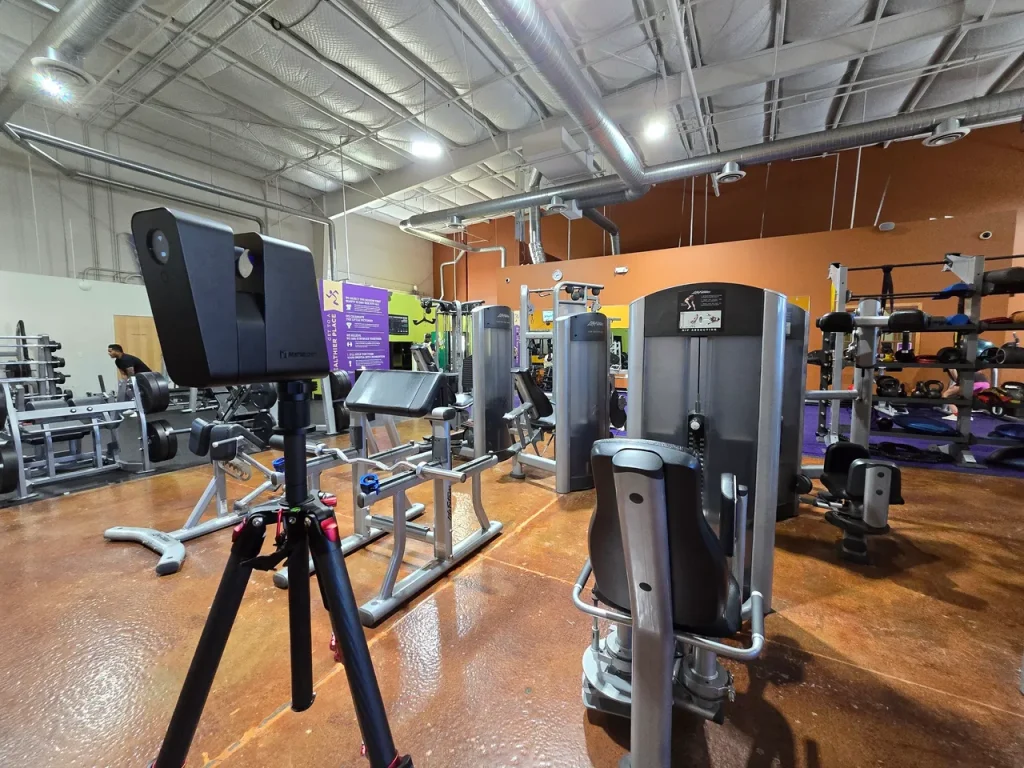
    Matterport Virtual Tour of a Fitness Center

    In today’s competitive market, small businesses need innovative tools to stand out and connect with customers. One powerful way to achieve this is by utilizing a Matterport virtual tour. This immersive, 3D technology creates a digital twin of your business space, allowing customers to explore it from anywhere in the world. Whether you own a boutique, café, salon, gym, or office, a Matterport tour can elevate your marketing strategy and grow your business. Here are the top advantages of having a Matterport tour for your small business.

    1. Create a Stunning First Impression

    In the digital age, your online presence is often your first impression. A Matterport tour offers a visually captivating experience that allows potential customers to see your space as if they were walking through it in person. This immersive experience builds trust and familiarity, making customers more likely to visit in person.

    2. Enhance Customer Convenience

    Matterport tours make it easy for customers to explore your space anytime, anywhere.

    • Plan ahead: A virtual tour helps customers feel confident about what to expect before they arrive.
    • Accessibility: It’s perfect for those who may have mobility challenges or live far away.
    • Save time: Customers can quickly assess if your services or products meet their needs, increasing the likelihood of serious inquiries.

    3. Boost Your SEO and Online Engagement

    Google loves engaging content, and a Matterport tour can significantly enhance your website’s SEO. By keeping visitors on your site longer, Matterport tours reduce bounce rates and increase user interaction.

    • Stand out on Google Maps: Embed your virtual tour directly into your Google Business Profile for increased visibility.
    • Social media appeal: Share your tour on platforms like Facebook, Instagram, and LinkedIn to drive traffic and spark interest.

    4. Increase Sales and Bookings

    When customers can explore your business in advance, they’re more likely to convert. A Matterport tour builds confidence by showing your space’s unique features and layout, encouraging purchases or bookings.

    • Hospitality: Showcase your event venue, restaurant, or rental property.
    • Retail: Highlight store layout, product displays, and special features.
    • Services: Demonstrate your salon, spa, or fitness studio’s inviting atmosphere.

    5. Improve Your Marketing ROI

    A Matterport tour is a cost-effective investment with long-term benefits.

    • Repurpose content: Use the 3D scans to create videos, photos, and virtual walkthroughs for marketing campaigns.
    • Wide applications: Integrate the tour into your website, email newsletters, and advertising efforts for maximum reach.
    • Always available: Unlike traditional advertising, your virtual tour is available 24/7 to potential customers.

    6. Build Trust and Transparency

    Customers appreciate honesty, and a Matterport tour provides an authentic, unfiltered view of your space. It’s a great way to establish trust and demonstrate that what they see online is what they’ll get in person.

    7. Stay Ahead of the Competition

    Many small businesses have yet to adopt virtual tours, giving you the opportunity to stand out. By offering a Matterport experience, you position your brand as innovative and customer-focused, setting yourself apart from competitors.

    8. Adapt to a Changing Marketplace

    As more consumers turn to online research before making decisions, having a Matterport tour positions your business to meet modern expectations. It’s an invaluable tool for attracting tech-savvy audiences and catering to a growing preference for online convenience.

    How Scan Your Space Can Help Your Business

    If you’re ready to harness the power of a Matterport 3D tour for your small business, Scan Your Space is your trusted partner in making it happen. With extensive expertise in Matterport technology and a client-focused approach, we ensure a seamless experience from start to finish. Here’s how we can help:

    1. Professional Scanning Services

    Scan Your Space uses state-of-the-art Matterport Pro2 and Pro3 cameras to create high-quality 3D virtual tours. Our team captures every detail of your space, ensuring an accurate and visually stunning digital twin that represents your business perfectly.

    2. Tailored Solutions for Your Business Needs

    We understand that every small business is unique. Whether you’re a retailer, a salon owner, or manage a restaurant, we customize your Matterport tour to highlight the features that set your business apart.

    3. Enhanced Marketing Assets

    Beyond the 3D tour itself, Scan Your Space can provide:

    • 4K-quality photos extracted from the Matterport scan.
    • Floor plans to offer customers additional insights.
    • 360° panoramic images for social media or website use.
    • HDR Photography for websites, blogs, social media, and email marketing.

    4. Expert Integration and Support

    Our team helps you integrate your virtual tour into your digital platforms, such as your website, Google Business Profile, and social media pages. We provide step-by-step guidance to ensure you get the most out of your investment.

    5. Affordable and Flexible Options

    We offer flexible pricing packages to fit your budget and business size. If you’re just starting, our scalable services allow you to add more features as your needs grow.

    Conclusion

    Investing in a Matterport tour for your small business isn’t just about showcasing your space—it’s about providing value to your customers and staying ahead in an ever-evolving digital landscape. From enhancing your marketing efforts to building trust and boosting sales, the advantages are undeniable.

    Ready to Elevate Your Business with a Matterport Tour?

    Partnering with Scan Your Space means more than just creating a 3D tour—it’s about crafting a powerful tool to engage customers and drive growth. Whether you’re looking to showcase your space, enhance your marketing, or boost online engagement, we’re here to help.
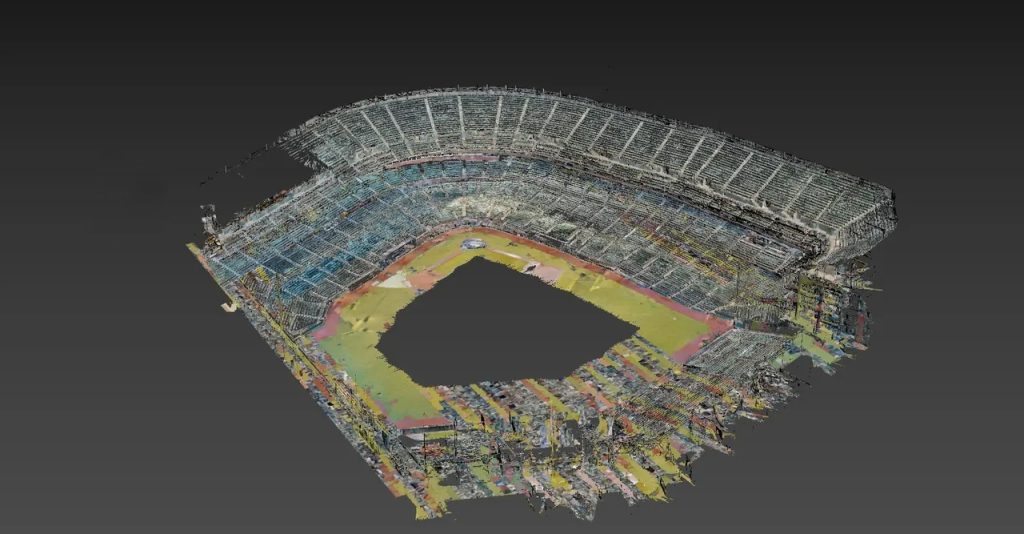
  • Use cases for scanning a stadium.

    Oracle Park, San Francisco, CA

    We were hired to scan Oracle Park, in San Francisco, CA. Home of the San Francisco Giants. Here are some use cases for scanning a stadium.

    • Architecture, Engineering, & Construction

    Design and planning: Architects and engineers can use the virtual tour to visualize and plan the construction of the stadium. By having a detailed 3D model of the stadium, they can identify potential issues and make more informed design decisions before construction begins.

    Construction managers can use the virtual tour to manage construction projects more effectively. By having a virtual model of the stadium, they can track progress and identify any issues that may arise during the construction process.

    Quality control: Contractors and construction workers can use the virtual tour to ensure that construction is completed to the required standards. By comparing the virtual model to the actual construction, they can identify any discrepancies or areas that need to be improved.

    Safety: Construction workers can use the virtual tour to identify potential safety hazards and plan safety measures accordingly. By having a detailed 3D model of the stadium, they can anticipate potential risks and take steps to minimize them.

    As built documentation for a BIM file. Oftentimes there are missing blueprints and plans from when a stadium was built. Scanning a stadium will produce an as built digital twin that can be used to generate data files or an d/or BIM files.

    Overall, having a 3D virtual tour of a baseball stadium can help construction teams manage projects more effectively, ensure quality control, and promote safety during the construction process.

    • Training purposes

    Having a 3D virtual tour of a baseball stadium can be beneficial for training staff in several ways:

    Orientation: New staff members can use the 3D virtual tour to familiarize themselves with the layout and features of the stadium. By exploring the virtual model, they can get a sense of where different areas of the stadium are located, such as the field, locker rooms, concession stands, and seating sections.

    Safety training: Staff members can use the virtual tour to learn about safety procedures and protocols in the stadium. By seeing the stadium in a 3D model, they can identify potential hazards and practice safety drills in a controlled environment.

    Event planning: Staff members responsible for planning events at the stadium can use the virtual tour to get a better sense of the available spaces and seating options. This can help them make more informed decisions about event layout, ticketing, and concessions.

    Customer service: Staff members who interact with visitors can use the virtual tour to gain a better understanding of the stadium and provide more accurate and helpful information to visitors. By having a virtual model of the stadium, they can answer questions about seating, directions, and amenities more confidently and effectively.

    Overall, having a 3D virtual tour of a baseball stadium can be a useful tool for staff training and development. By providing a comprehensive and interactive view of the stadium, staff members can become more knowledgeable and confident in their roles, leading to better customer service and a more enjoyable experience for visitors.

    • Facilities management

    Scan the ballpark and tag key pieces of equipment such as generators, boilers, electronics, etc with links to the products, repair manuals, instructional videos, etc. 3D Virtual tours allow the viewer to view these tags, take on screen measurements of items such as windows, doors, and walls to get an accurate measurement. By having a virtual model of the stadium, it can be easier to identify areas that need repairs or upgrades, or to plan for maintenance tasks.

    • Vendor use

    Ballparks are large, its easy to get lost. Provide a vendor a link to the 3D virtual tour to a specific pathway from parking to the place they need access to. This can help ensure that people are where they need to be and not getting lost.

    • Insurance purposes

    Risk assessment: Insurance companies need to assess the risk associated with insuring a stadium. By having a 3D virtual tour of the stadium, they can get a better sense of the layout, design, and potential hazards that might be present. This can help them make more accurate risk assessments and determine appropriate insurance premiums.

    Claims management: If there is damage or loss to the stadium, having a 3D virtual tour can be useful for insurance claims management. Insurance adjusters can use the virtual model to assess the extent of the damage and determine the scope of repairs that are needed. This can help streamline the claims process and ensure that repairs are completed more quickly.

    Compliance and safety: Insurance companies may require stadiums to meet certain safety standards and compliance regulations in order to be insured. By having a 3D virtual tour of the stadium, insurance companies can ensure that these standards are being met and identify any areas of concern that may need to be addressed.

    Overall, having a 3D virtual tour of a baseball stadium can help insurance companies make more informed decisions about risk assessment, claims management, and compliance. By providing a detailed and accurate representation of the stadium, it can help ensure that insurance policies are appropriate and that any issues are addressed promptly.

    • Marketing and promotion

    A 3D virtual tour of a baseball stadium can be used to showcase the facility to potential visitors or clients. This can be especially useful for event planners, who may want to see the space before booking it for a wedding, corporate event, or other gathering.

    Fan engagement: Sports teams and stadiums can use 3D virtual tours to engage with fans who are unable to attend games in person. By offering a virtual tour of the stadium, fans can get a sense of what it’s like to be at the game and explore different areas of the facility.

    Historical preservation: For historic stadiums or venues, a 3D virtual tour can be a way to preserve the space for future generations. By creating a detailed model of the stadium, it can be possible to capture the unique architecture, design, and features of the facility that might otherwise be lost over time.

    • Emergency Preparedness

    Having a 3D virtual tour of a baseball stadium can be useful for emergency preparedness in several ways:

    Pre-planning: Emergency responders and stadium management can use the virtual tour to pre-plan emergency response procedures. By having a detailed 3D model of the stadium, they can identify potential hazards and plan evacuation routes and emergency response strategies.

    Training: Emergency responders can use the virtual tour to train for emergency scenarios. By simulating emergency situations in the virtual model, responders can practice their response strategies in a controlled environment.

    Communication: During an emergency, responders and stadium management can use the virtual tour to communicate more effectively. By having a shared virtual model of the stadium, they can coordinate response efforts and provide clear instructions to staff and visitors.

    Risk assessment: Stadium management and emergency responders can use the virtual tour to assess potential risks and plan appropriate responses. By identifying potential hazards and simulating emergency scenarios, they can plan for a range of potential emergencies and develop effective response plans.

    Overall, having a 3D virtual tour of a baseball stadium can help emergency responders and stadium management prepare for emergencies more effectively. By identifying potential risks, simulating emergency scenarios, and coordinating response efforts, they can minimize the impact of emergencies and ensure the safety of staff and visitors.

    See more information on the youtube video I created here

    Products used to scan the stadium

    Matterport Pro3 Camera: https://amzn.to/3K2LRy2

    Matterport Pro3 Spare Battery: https://amzn.to/3ZPDkFH

    Matterport Pro3 Mount: https://amzn.to/3J0og22

    Promaster Specialist SP425CK Tripod: https://amzn.to/3XqVoEy

    Apple 2022 12.9-inch iPad Pro (Wi-Fi + Cellular, 2TB) – Space Gray (6th Generation): https://amzn.to/3Z5JiBB

    Seymac case for ipad: https://amzn.to/3Z2BGQw

    Apple Pencil 2nd gen: https://amzn.to/3m5yC7w

    Power Bank 50000mAh Battery Pack: https://amzn.to/3K0m0qq